
Monitor Competitors by Using Their XML Sitemap
By Nicolas Montanares | 24th June 2026
Google Sheets Is a Web Crawler
I find it absolutely stunning what you can create using just basic tools like Google Sheets. I’ve been doing automations for a long time now but since I got my hands on AI tools like ChatGPT, Claude and Gemini it’s become so laughably easy that I can’t imagine going back.
Here’s a fun fact that might surprise you: Google Sheets is actually a crawler disguised as an accountants best friend. You can make use of the infamous =importxml() formula in many boring different ways or you can use it to scrape a website! You can create an outreach tool that will collect contact information, you can make a simple Tech SEO auditing tool that will check for basic Technical SEO issues or you can use it to monitor your competition. In this article we’ll be looking at this last scenario.
Home Brewed Competitor Monitoring System
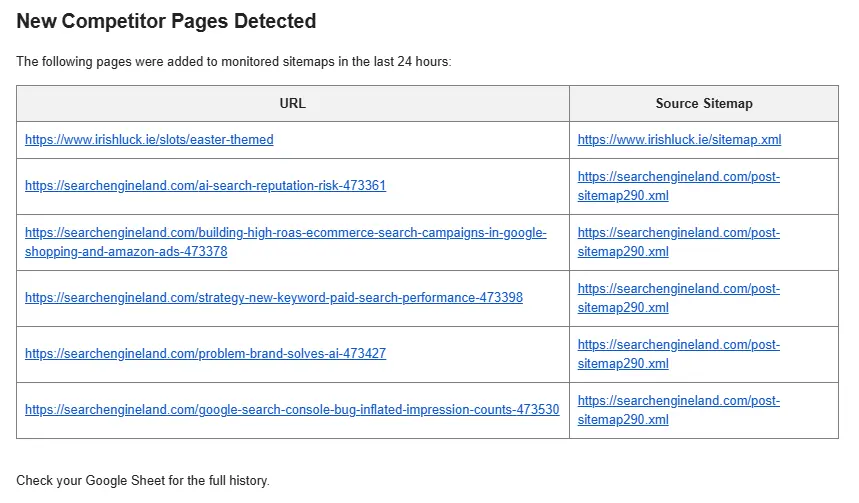
Essentially you take the competitors XML sitemap and hook it up to Google sheets and then monitor it with a script. Every day, week or month you make the script compare the previous sitemap with the current sitemap and get it to send you the difference. You can see what they’ve published or unpublished and act accordingly. You don’t need to limit yourself to one competitor, in the example below I made it so you can just add multiple xml sitemaps from different sites and it will still work.
Another option to further improve or customize this system is to limit which pages are reported to you. Maybe you are only interested in parts of the competitors website or maybe you want to take it one step further and use AI to analyze the website to get primary keyword data so you can be informed when the competitor publishes something in your niche. For that last scenario you would probably need more than just Google Sheets if you want AI capabilities (although from top of mind you could do an elaborate if this then that sort of rule where you check meta tags, keyword density and headers to identify likely keywords – but maybe a bit overkill to be honest).
Getting Started
This is going to be brutaly simple but for clarity here is the how to:
- Create a new Google Sheet
- Add 2 tabs and name them ‘Sitemap’ and ‘Data’
- In your ‘Sitemap’ tab add a header in A1 followed by the sitemaps you want to monitor (A2 and down)
- In the top menu click on ‘Extensions’ then click on ‘Apps Scripts’
- Paste the script written below (NOTE: Add your email in line 2!)
- Run the script once to ensure it has sufficient permissions to send you an email
- Wait a day and check your inbox for the SEO Alert message.
This is the script you need to copy into the Apps Scripts section, do remember to change the email in line 2 or it will not work.
const SPREADSHEET_ID = SpreadsheetApp.getActiveSpreadsheet().getId();
const EMAIL_RECIPIENT = "ENTER YOUR EMAIL HERE"; // CHANGE THIS

/**
 * Main function to run daily
 */
function runDailySitemapAudit() {
  const ss = SpreadsheetApp.openById(SPREADSHEET_ID);
  const sitemapSheet = ss.getSheetByName("Sitemaps");
  const dataSheet = ss.getSheetByName("Data");

  const sitemapIndexes = sitemapSheet.getRange("A2:A" + sitemapSheet.getLastRow()).getValues().flat().filter(url => url !== "");
  const existingUrls = new Set(dataSheet.getRange("A:A").getValues().flat());

  let allCurrentUrls = [];
  let newPagesFound = [];
  const today = new Date().toLocaleDateString();

  sitemapIndexes.forEach(indexUrl => {
    const urls = fetchAllUrlsFromIndex(indexUrl);
    urls.forEach(url => {
      if (!existingUrls.has(url)) {
        newPagesFound.push([url, today, indexUrl]);
        existingUrls.add(url); // Prevent duplicates in the same run
      }
    });
  });

  if (newPagesFound.length > 0) {
    // Save new pages to the database
    dataSheet.getRange(dataSheet.getLastRow() + 1, 1, newPagesFound.length, 3).setValues(newPagesFound);

    // Send the email report
    sendCurationEmail(newPagesFound);
  }
}

/**
 * Recursively fetches URLs from index sitemaps or regular sitemaps
 */
function fetchAllUrlsFromIndex(sitemapUrl) {
  let foundUrls = [];
  try {
    const response = UrlFetchApp.fetch(sitemapUrl, {muteHttpExceptions: true});
    const xml = response.getContentText();
    const document = XmlService.parse(xml);
    const root = document.getRootElement();
    const namespace = root.getNamespace();

    // Check if it's a Sitemap Index (contains other sitemaps)
    if (root.getName() === 'sitemapindex') {
      const sitemaps = root.getChildren('sitemap', namespace);
      sitemaps.forEach(s => {
        const loc = s.getChild('loc', namespace).getText();
        foundUrls = foundUrls.concat(fetchAllUrlsFromIndex(loc)); // Recursive call
      });
    }
    // Check if it's a standard URL Set
    else if (root.getName() === 'urlset') {
      const urls = root.getChildren('url', namespace);
      urls.forEach(u => {
        const loc = u.getChild('loc', namespace).getText();
        foundUrls.push(loc);
      });
    }
  } catch (e) {
    console.log("Error parsing: " + sitemapUrl + " - " + e.toString());
  }
  return foundUrls;
}

/**
 * Formats and sends the daily email
 */
function sendCurationEmail(newPages) {
  let htmlBody = "<h2>New Competitor Pages Detected</h2><p>The following pages were added to monitored sitemaps in the last 24 hours:</p><table border='1' style='border-collapse: collapse; width: 100%;'><tr><th style='padding: 8px; background-color: #f2f2f2;'>URL</th><th style='padding: 8px; background-color: #f2f2f2;'>Source Sitemap</th></tr>";

  newPages.forEach(row => {
    htmlBody += `<tr><td style='padding: 8px;'><a href='${row[0]}'>${row[0]}</a></td><td style='padding: 8px;'>${row[2]}</td></tr>`;
  });

  htmlBody += "</table><p><br>Check your Google Sheet for the full history.</p>";

  MailApp.sendEmail({
    to: EMAIL_RECIPIENT,
    subject: `🚨 SEO Alert: ${newPages.length} New Competitor Pages Found`,
    htmlBody: htmlBody
  });
}
The Power of Automation
The real power is to adapt the above to your specific requirements and by doing so learning how to use these powerful tools. Sometimes all you need is just a plain Google Sheet to do some pretty remarkable stuff. I strongly encourage you to check it out and for your comfort you can find an existing version of this sheet that you can just clone instead of following all the steps above.
Hopefully this is the first of many such tutorials so make sure to stick around and give me a follow on Linkedin if you want to be notified about my next automation tutorial.